New Block Kit data table block
The data table block is now available for use with Block Kit.
For more details about building with Block Kit, check out our Block Kit overview!
The data table block is now available for use with Block Kit.
For more details about building with Block Kit, check out our Block Kit overview!
We've added the following tools to the Slack MCP server:
Read all about the MCP server in the API docs.
The following new blocks are now available when using Block Kit:
In addition, we've made some updates to the text-streaming API methods to support streaming blocks:
For more details about building with Block Kit, check out our Block Kit overview!
We are excited to announce support for Proof Key for Code Exchange (PKCE). PKCE is an OAuth security extension that enables developers to build more secure Slack applications on public clients, such as desktop apps and mobile apps, without the need to embed a vulnerable client_secret.
Previously available in early access by request only, PKCE can now be enabled directly in your app settings without contacting Slack support.
myApp://auth) will always receive rotating tokens, even if token rotation is turned off. OAuth installations issued to a standard web URL (e.g. myWebshite.com/auth) will only receive rotating tokens if the 'token rotation' setting is enabled. All refresh tokens issued to PKCE-enabled apps expire after 30 days.code_challenge, code_challenge_method, code_verifier) are optional for standard OAuth flows, but required when redirecting to a custom URI scheme.localhost redirects for PKCE-enabled apps) cannot request bot scopes.Check out the PKCE documentation to learn how to implement the full PKCE flow, including how to generate a code_verifier, construct the authorization URL, and exchange the code using the oauth.v2.access API method without a client secret.
You can now mark individual OAuth scopes as optional when configuring your Slack app! Optional scopes give users more control over what data your app can access during installation, without blocking them from installing your app entirely.
What's changed:
bot_optional and user_optional fields.bot_optional and user_optional—are now supported under oauth_config.scopes. See App manifest fields for details.If your app uses scopes that aren't strictly required for core functionality, consider marking them as optional to improve installation rates. Read more on the Installing with OAuth page.
The following new supported markdown types for rich text when using Block Kit in your apps are being rolled out:
Check out our rich text block and markdown block reference for more details!
We're excited to announce the release of not one, but two, major components designed to significantly enhance how Large Language Models (LLMs) and AI agents interact with your workspace data: the Slack Model Context Protocol (MCP) server and the Real-time Search (RTS) API!
The MCP server enables AI agents to interact with Slack content through tools designed for LLM-driven discovery, configuration, and execution. Unlike APIs, the MCP server is built specifically for LLM consumption with robust descriptions and examples that return natural language responses. Refer to our documentation to learn more about the Slack MCP server.
The Data Access API has evolved into the Real-time Search API! This API allows users to access Slack data through a secure search interface, enabling third-party applications to retrieve relevant Slack data without storing customer information on external servers. Get started using the Real-time Search API with this guide or get straight to business with the method reference.
assistant.search.contextAlong with these changes, the assistant.search.context API method has undergone a scope change. The assistant.search.context API method moved away from the single search:read scope to a set of granular search:read.* scopes:
search:read.public (required) - for public channel accesssearch:read.private - for private channels (with user consent)search:read.im - for direct messages (with user consent)search:read.mpim - for multi-party direct messages (with user consent)This change allows for more granular control over what data AI-enabled apps can access.
Display your apps' and agents' actions with three new Block Kit components:
task_card block displays a single task.url source element displays clickable URL references within a task card.plan block displays multiple of those tasks together in a unified view.How tasks are displayed is set with a new parameter in the text-streaming API methods: task_display_mode. Use this to choose whether your app's tasks appear individually or in a comprehensive plan.
Then update the task cards and plan via the new chunks parameter. The parameter also supports plain markdown.
Ready to test it out? Check out our guide on developing AI apps, or jump straight to the text-streaming methods' reference pages:
You can now replay events that your app might have missed! In case of an outage where your app may have missed events, we've released a Delayed Events feature that lets you replay past events. Read all about it in the Events API docs.
Installing with OAuth is a major point of entry for users installing Slack apps. This flow guides users through configuring the various options their apps require to be installed successfully both at the workspace and org level, as well as the permissions their apps need from the workspace or org prior to installation.
The new and improved page replaces the old single-column OAuth experience with a brand new double-column, fully responsive view - making all of the configuration options and permissions details easier to read and understand while stepping through the OAuth flow.
We hope you enjoy the new experience!
As you may have spied in the Slack CLI v3.9.0 release yesterday, support for Work Objects is now generally available! 🎉
Work Objects allow you to represent and collaborate on data from third-party services where the work is already happening, right in Slack. They have two primary components: an unfurl component, and a flexpane component.
We've also introduced a new entity_details_requested event and the entity.presentDetails API method, and have added support for Work Objects to the chat.unfurl API method. SDK support for these API updates is coming soon.
To learn how it all comes together to create a seamless experience for your users, check out the full documentation!
We've introduced a new suite of features to help Slack apps provide an end-user experience typical of LLM tools:
Read on for more info!
The following API methods are now publicly available for interacting with Lists in Slack!
We've added a simpler way to display structured, tabular data in Slack: the Block Kit table block! Read more about how to implement this block in your app code here.
The Slack Web API featured workflows methods are now available! Use the workflows.featured.add, workflows.featured.list, workflows.featured.remove, and workflows.featured.set methods to manage featured workflows programmatically.
The markdown block for Block Kit accepts standard markdown and outputs formatted Slack markdown; intended for use in apps that use platform AI features.
This API is now available in a limited release for interested partners. Use the Data Access API within apps that have the Agents & AI Apps feature enabled to access all the relevant Slack data you need to ensure a pleasant user experience for AI-enabled apps
We're excited to announce that the following new features have launched!
Refer to workflow steps and custom steps for Bolt apps for more details.
You can now set an event as all_resources: true instead of listing individual channel_ids. This allows your event trigger to listen to any channel your app is part of. Check out scoping channel-based event triggers for more details.
Use the new Block Kit file_input element in your apps or functions. Get more details here.
Keep your user data secret and safe. Both versions of the SCIM API now support restricting token usage by IP address.
Ever wanted to include the formatting available in the message composer to your form modals or Block Kit surfaces? You can now use the rich text input to collect formatted answers from users and also post Block Kit payloads that include rich text blocks. Try them out in Block Kit Builder now. Hint: Check-out the "edit" functionality (hover and click the pencil icon) to compose rich text blocks in-line.
Use these methods to manage the same workflow permissions and approval requests you can from the admin settings site dashboard, sans the UI and with bulk operations.
Read more here.
admin.apps.requests.list API is enhanced to fetch Org AAA requests using enterprise_id arg.
admin.apps.requests.list API response is enhanced to include the is_user_app_collaborator of the app.
Admin apps API response is enhanced to include the developer_type of the app.
If you rely or want to rely on stateful Block Kit views, we have some exciting news for you. The payloads for view_submission and block_actions will have some new additions. Read on to learn more.
This autumn, Slack will make what-you-see-is-what-you-get (WYSIWYG) editing available to users.
Once we release WYSIWYG editing, the text field found in message objects your app encounters will become an approximation of a user's more richly formatted message.
To capture a message's full nuance and vibrancy, your app may look to the new blocks attribute included with such messages.
We're modernizing the GET /Users and GET /Groups methods of our SCIM user management API by putting a more reasonable upper bound on results served per page.
The SCIM spec allows for pagination and these methods have long supported it, but we've accepted higher count values in the past.
The changes described below are effective July 8th, 2019 August 30th, 2019.
The data structure that represents a message now contains additional new fields on top of all the existing fields your app may be currently expecting. The new structure took effect on February 13, 2019.
These changes come with Block Kit—a new set of components for Slack apps that can be combined to create visually rich and compellingly interactive messages. You can read more about Block Kit below.
Even if you aren't using Block Kit to compose messages, its launch still affects the data structure of messages received via our APIs, so read on to learn how to prepare your apps.
Workspace apps use an access token to represent all the permissions granted to your app by a workspace.
Workspace tokens are so potent and powerful that apps should take great care to keep them safe and secret. We're releasing a OAuth 2.0-based token expiration and rotation system that will make workspace tokens short-lived while providing your app a secure means to refresh tokens as needed.
For more detail on the ins and outs of token rotation, check out our full documentation.
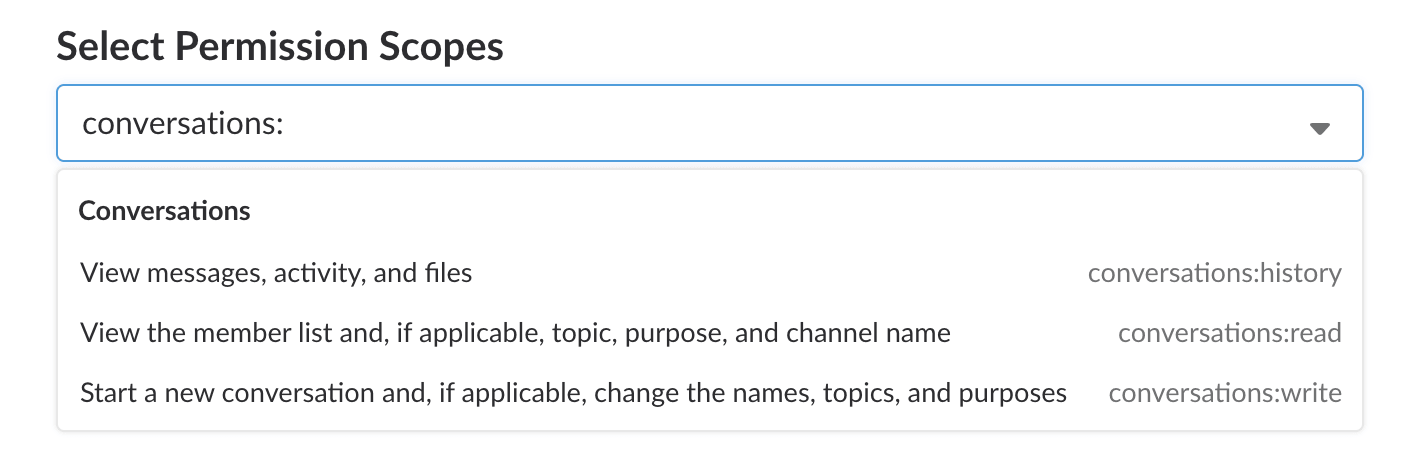
Workspace apps can now use a simplified interface for working with the Conversations API methods. A workspace app can request three new scopes: conversations:history, conversations:read, and conversations:write. These three scopes cast an umbrella of permission over each different conversation type: channels, DMs, or anything in between.
These new scopes make it even easier to use Conversations API methods, allowing apps to negotiate permissions for, and then interact with, all types of conversations at once.
We now serve query string parameters on the wss:// WebSocket URIs produced by rtm.connect and rtm.start.
While the specification for WebSockets explicitly allows query string parameters, some third party libraries not fully implementing the spec may handle these parameters incorrectly, stripping them off and invalidating your attempts to open a connection.
Though we didn't anticipate issues sending query strings in websocket URIs, some libraries and frameworks may need tinkering with.
github.com/nlopes/slack? Update to the latest version of this Golang project to resolve connection issues. A recent commit merged with master fixes websocket URI handling.Incoming webhooks can do it. Slash commands and interactive messages speak it fluently. The message builder knows no other format. But, until now, chat.postMessage stubbornly refused to understand your messages composed in impeccable JSON.
Finally, Slack allows you to send JSON to a wide selection of write-based Web API methods. Additionally, now you can better separate concerns when presenting your credentials to Slack.
Slack now supports multiple languages, and your app or integration can too.
Add a locale in user and conversation by using the include_locale=true parameter when requesting a bundle of Web API methods supporting it.
The locale field is a string containing a IETF language code, such as en-US. fr-FR, es-ES, or de-DE, and other future values.
We now support include_locale on these methods. Opt-in to receive a locale field in user profiles or the locale of a conversation.
If you don't include the parameter, no locale will be provided. It's opt-in.
You'll also see locale information changes in related user profile change events in the RTM and Events APIs.
We want to tell you even more about your API requests. On November 1st we'll begin including a response_metadata field in HTTP API responses.
At first it will include a warnings array, just as the top-level JSON response does today. API warnings are great example of the kind of information we want to communicate in this response metadata, so please forgive our duplication.
Later we'll include a messages array. It will include human-readable descriptions of errors or warnings generated by your request.
Within the next few weeks, we'll add event_ts timestamp fields to additional streamed events you receive in the real-time messaging API.
The event_ts field differs from the ts timestamp fields you already receive with most events. The ts field is associated with the object or transition the event is describing while the event_ts attribute refers to the streamed event.
The ts field is like a date scrawled on a letter contained within an envelope — it's part of the message itself.
The event_ts is like a postmark stamped on the envelope as part of the postal process, an artifact of the workflow used to deliver the message to the intended recipient.
As with ts, event_ts is expressed in a kind of "epoch time", contained within a string and including fractions of seconds.
An example event_ts timestamp value of "1361482916.000004", could be converted to UTC as 2013-02-21 21:41:56 UTC.
event_ts is especially useful when noting your real time progress through a channel's history.
reminders API methods for managing reminders in Slackreminders OAuth scopes for calling the new methodsThe following API methods have been released, allowing you to programmatically add, remove, and manage reminders.
The following OAuth scopes will grant you access to the new methods listed above: